Decisions API はテキストや画像を、アプリケーションで利用できる意思決定 (decisions) へと変換します。
Decisions API はテキスト、画像、またはその両方を評価して、Responses API よりも約10倍高速に型付けされた回答を返します。条件が真である確率、固定された集合からの選択結果、または評価基準 (rubric) に基づくスコアを取得できます。
OpenAI Decisions API
作成 : Masashi Okumura (@ClassCat)
作成日時 : 10/14/2026
* 本記事は developers.openai.com の以下のページを参考にしています :
* サンプルコードの動作確認はしておりますが、必要な場合には適宜、追加改変しています。
OpenAI Decisions API
Decisions API はテキストや画像を、アプリケーションで利用できる意思決定 (decisions) へと変換します。Responses API と比べて約10倍高速です。
Decisions API はテキスト、画像、またはその両方を評価して、Responses API よりも約10倍高速に型付けされた回答を返します。条件が真である確率、固定された集合からの選択結果、または評価基準 (rubric) に基づくスコアを取得できます。これらの回答を利用して、アプリケーション内でのコンテンツの分類、リクエストのルーティング、作業の優先順位付けを行えます。
コードを書く前に質問や入力を試してみたい場合は、Playground で Decisions API をお試しください。
ℹ️ The Decisions API is in public beta, and we expect to GA in the coming weeks. gpt-6-luna is the only model currently available. Use the dedicated POST /v1/decisions endpoint.
※ To run the SDK examples below, use these OpenAI SDK versions or later: Python 3.26.0, JavaScript 7.30.0, Go 3.73.0, Ruby 0.101.0, and Java 4.78.0. See OpenAI SDK for installation instructions.
decisions API の仕組み
リクエストは3つの要素から構成されます :
| フィールド | 目的 |
|---|---|
| model | リクエストを評価するモデル。現在サポートされているのは gpt-6-luna のみです |
| input | 質問に対する共有されるエビデンス: テキスト文字列、またはテキストや画像を含むユーザーメッセージ |
| questions | 評価する内容で、各質問のタイプ、指示、および許容された選択肢やスコアレベルを含みます |
レスポンスには `answers` 配列が含まれます。各質問の回答を識別できるよう、それぞれの質問に一意の `name` を指定してください; API はレスポンス内でその name をエコーバックします。
Choose a question type
| タイプ | 用途 | 主な結果 |
|---|---|---|
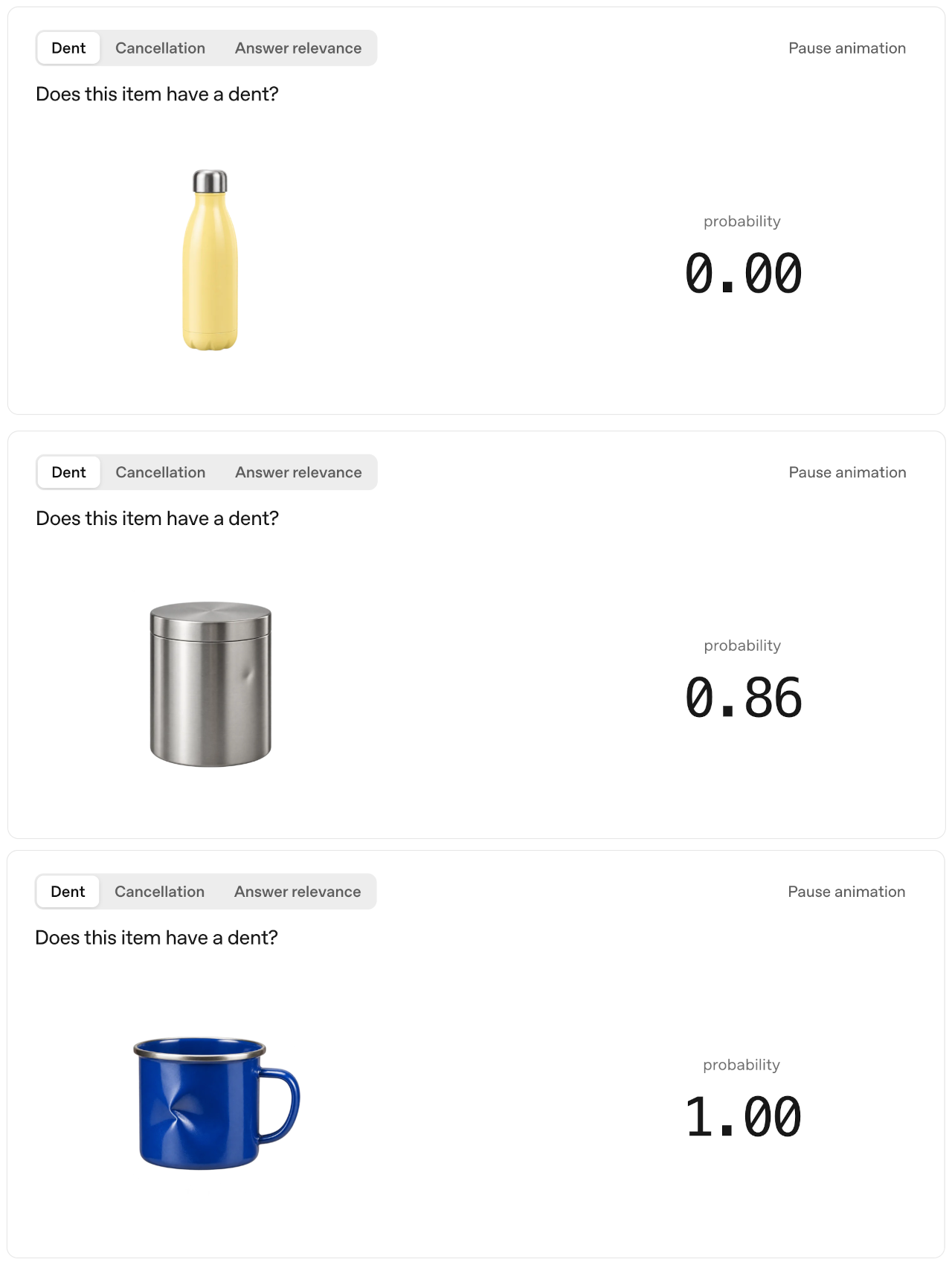
| predicate | 条件を判定する (例: 目に見える損傷の有無、文章の関連性) | `probability`: その条件が真である確率の推定値 (0〜1) |
| choice | 1つの選択肢を選ぶ (例: 担当部署、コンテンツのカテゴリ) | `choice`: 指定した値のうちのいずれか1つ |
| score | 順序付けられたレベルに照らして入力を評価する (例: 問題の重大度) | `score`: 各レベルのインデックスの確率加重平均 |
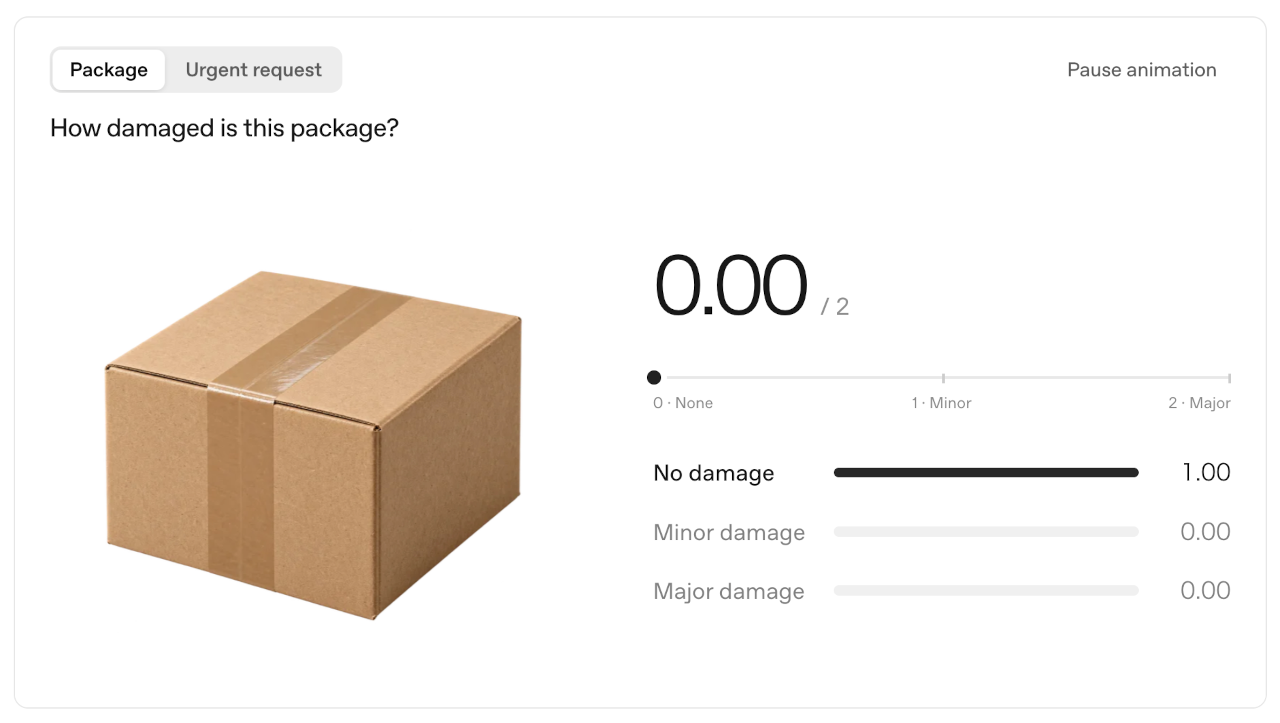
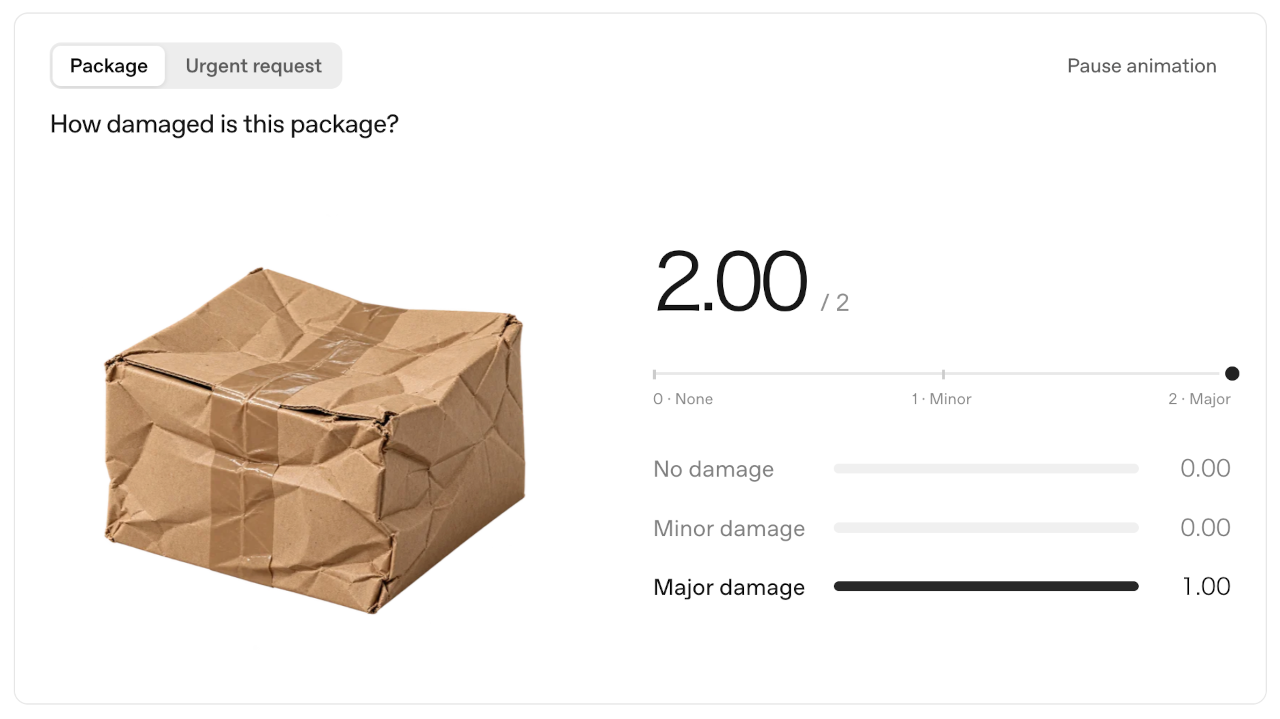
choice と score はどちらも、離散的な選択肢に対する確率を返します。部署名のように順序のないカテゴリには choice を使用してください。重大度 (severity) のように順序付けられたレベルには score を使用します; これは数値インデックス (指標) の確率加重平均を用いて、複数のレベルにまたがるスコアを算出します。
アプリケーションでこれらの回答タイプのいずれかが必要な場合は、Decisions API を使用してください。抽出されたフィールドや文章による説明など、独自の JSON スキーマに従ったオブジェクトを生成する必要がある場合は Responses API の Structured Outputs を使用し、モデルに引数付きのツール呼び出しを要求させたい場合は function calling を使用してください。
画像内の目に見える損傷をチェックする
製品の写真に目に見える損傷がないか確認するには、predicate タイプの質問を使用します。このリクエストでは、画像と “crack, tear, or dent” (ひび割れ、破れ or へこみ) を探す指示を組み合わせて指定します。
Check an image for visible damage
Curl
IMAGE_BASE64="$(base64 < product.png | tr -d '\r\n')"

curl https://api.openai.com/v1/decisions \
  -H "Authorization: Bearer $OPENAI_API_KEY" \
  -H "Content-Type: application/json" \
  --data-binary @- <<JSON
{
  "model": "gpt-6-luna",
  "input": [{
    "role": "user",
    "content": [
      {"type": "input_text", "text": "Inspect the product in this photo."},
      {"type": "input_image", "image_url": "data:image/png;base64,$IMAGE_BASE64"}
    ]
  }],
  "questions": [{
    "type": "predicate",
    "name": "visible_damage",
    "instructions": "Does the product have visible damage, such as a crack, tear, or dent? Ignore shadows and damage to the packaging."
  }]
}
JSON
JavaScript
import { readFile } from "node:fs/promises";
import OpenAI from "openai";

const client = new OpenAI();
const imageBase64 = (await readFile("product.png")).toString("base64");
const decision = await client.decisions.create({
  model: "gpt-6-luna",
  input: [
    {
      role: "user",
      content: [
        { type: "input_text", text: "Inspect the product in this photo." },
        {
          type: "input_image",
          image_url: `data:image/png;base64,${imageBase64}`,
        },
      ],
    },
  ],
  questions: [
    {
      type: "predicate",
      name: "visible_damage",
      instructions:
        "Does the product have visible damage, such as a crack, tear, or dent? Ignore shadows and damage to the packaging.",
    },
  ],
});

const answer = decision.answers[0];
if (answer.type === "refusal") {
  console.log(`Refused: ${answer.name}`);
} else if (answer.type === "predicate") {
  console.log(`Visible damage probability: ${answer.probability}`);
}
import base64
from pathlib import Path

from openai import OpenAI

client = OpenAI()
image_base64 = base64.b64encode(Path("product.png").read_bytes()).decode("ascii")

decision = client.decisions.create(
    model="gpt-6-luna",
    input=[
        {
            "role": "user",
            "content": [
                {"type": "input_text", "text": "Inspect the product in this photo."},
                {
                    "type": "input_image",
                    "image_url": f"data:image/png;base64,{image_base64}",
                },
            ],
        }
    ],
    questions=[
        {
            "type": "predicate",
            "name": "visible_damage",
            "instructions": (
                "Does the product have visible damage, such as a crack, tear, or dent? "
                "Ignore shadows and damage to the packaging."
            ),
        }
    ],
)

answer = decision.answers[0]
if answer.type == "refusal":
    print(f"Refused: {answer.name}")
elif answer.type == "predicate":
    print(f"Visible damage probability: {answer.probability}")
レスポンスの例 (抜粋) :
{
  "answers": [
    {
      "type": "predicate",
      "name": "visible_damage",
      "probability": 0.92
    }
  ]
}
`probability` は、その条件が真であるとモデルが推定した確率です。ユーザが選択した閾値に基づいて、人間によるレビュー対象として写真をフラグ付けするためにに使用します。
画像はインラインの base64 データ URL である必要があります。ホストされた HTTP または HTTPS の画像 URL や `file_id` による入力は、このエンドポイントではサポートされていません。画像を指示やその他のコンテキストと一緒に評価するには、ユーザーメッセージ内で `input_text` と `input_image` の各パーツを組み合わせてください。
固定された選択肢から選ぶ
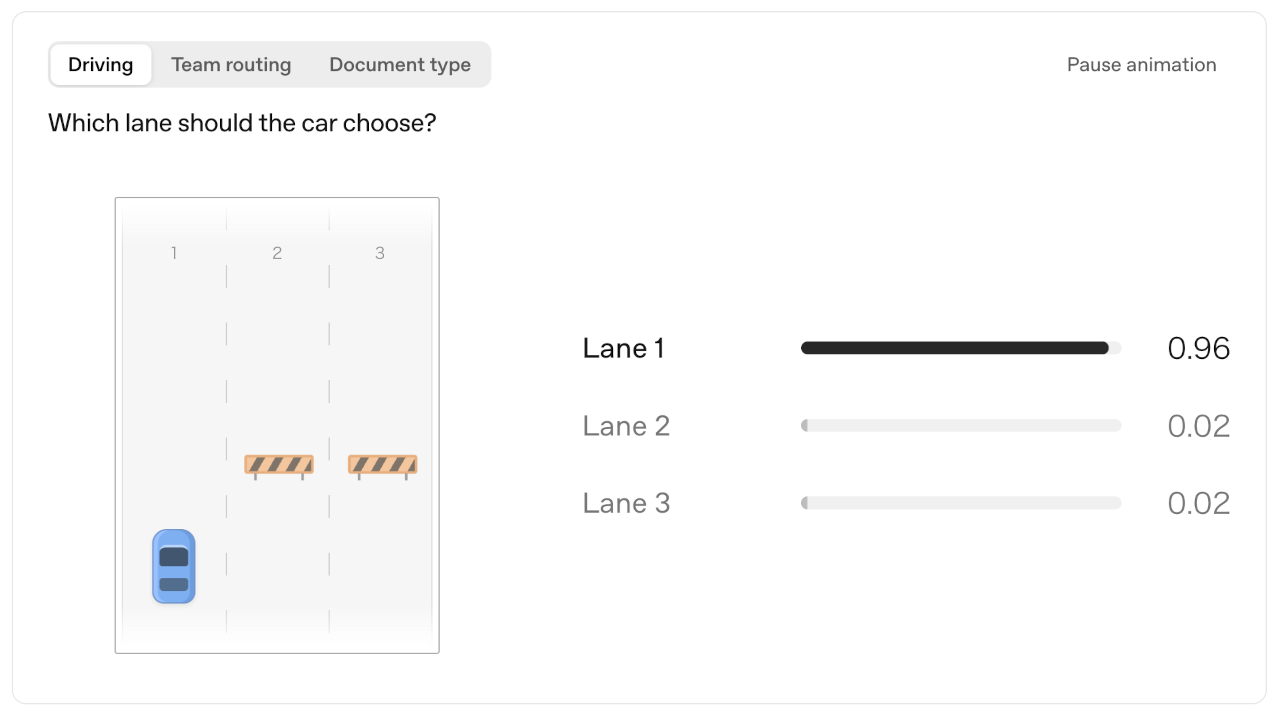
choice タイプの質問は、指定した選択肢の中から1つの値を選択します。それぞれの選択肢がどのような場合に当てはまるかを説明した、明確に区別できる `value` と `description` を使用してください。
Route a customer complaint
Curl
curl https://api.openai.com/v1/decisions \
  -H "Authorization: Bearer $OPENAI_API_KEY" \
  -H "Content-Type: application/json" \
  -d '{
    "model": "gpt-6-luna",
    "input": "I was charged twice for my order.",
    "questions": [{
      "type": "choice",
      "name": "department",
      "instructions": "Which department should handle this complaint?",
      "choices": [
        {"value": "billing", "description": "Payments, invoices, and refunds."},
        {"value": "technical", "description": "Problems using the product."},
        {"value": "shipping", "description": "Delivery and tracking."},
        {"value": "other", "description": "Requests outside these categories."}
      ]
    }]
  }'
Python
from openai import OpenAI

client = OpenAI()
decision = client.decisions.create(
    model="gpt-6-luna",
    input="I was charged twice for my order.",
    questions=[
        {
            "type": "choice",
            "name": "department",
            "instructions": "Which department should handle this complaint?",
            "choices": [
                {"value": "billing", "description": "Payments, invoices, and refunds."},
                {"value": "technical", "description": "Problems using the product."},
                {"value": "shipping", "description": "Delivery and tracking."},
                {"value": "other", "description": "Requests outside these categories."},
            ],
        }
    ],
)

answer = decision.answers[0]
if answer.type == "refusal":
    print(f"Refused: {answer.name}")
elif answer.type == "choice":
    print(f"Department: {answer.choice} (confidence: {answer.confidence})")
レスポンスの例 (抜粋) :
{
  "answers": [
    {
      "type": "choice",
      "name": "department",
      "choice": "billing",
      "probabilities": [
        { "value": "billing", "probability": 0.95 },
        { "value": "technical", "probability": 0.02 },
        { "value": "shipping", "probability": 0.01 },
        { "value": "other", "probability": 0.02 }
      ],
      "confidence": 0.93
    }
  ]
}
回答の choice フィールドには、指定した選択肢の値、この例では "billing" が入ります。また、各選択肢に対する probabilities (確率) の配列と confidence (信頼度) フィールドも含まれます。See Interpret the answers for guidance on setting thresholds.
定義したカテゴリですべての入力パターンを網羅できない場合は、"other" のようなフォールバック用の選択肢を含めてください。アプリケーション側でその結果を一般的なレビュー用キューに送るように処理できます。
評価基準 (rubric) に照らしてスコアリングする
score タイプの質問は、順序付けられたレベルに照らして入力を評価します。各レベルの基準を定義し、それらを最も低いものから最も高いものの順に並べます。
Score an issue against severity levels
Curl
curl https://api.openai.com/v1/decisions \
  -H "Authorization: Bearer $OPENAI_API_KEY" \
  -H "Content-Type: application/json" \
  -d '{
    "model": "gpt-6-luna",
    "input": "Export fails in Safari but works in Chrome.",
    "questions": [{
      "type": "score",
      "name": "severity",
      "instructions": "How severe is this issue?",
      "levels": [
        {"label": "Cosmetic", "description": "Appearance only; no lost functionality."},
        {"label": "Workaround available", "description": "A task fails, but another way works."},
        {"label": "Fully blocked", "description": "A task fails with no workaround."}
      ]
    }]
  }'
Python
from openai import OpenAI

client = OpenAI()
decision = client.decisions.create(
    model="gpt-6-luna",
    input="Export fails in Safari but works in Chrome.",
    questions=[
        {
            "type": "score",
            "name": "severity",
            "instructions": "How severe is this issue?",
            "levels": [
                {
                    "label": "Cosmetic",
                    "description": "Appearance only; no lost functionality.",
                },
                {
                    "label": "Workaround available",
                    "description": "A task fails, but another way works.",
                },
                {
                    "label": "Fully blocked",
                    "description": "A task fails with no workaround.",
                },
            ],
        }
    ],
)

answer = decision.answers[0]
if answer.type == "refusal":
    print(f"Refused: {answer.name}")
elif answer.type == "score":
    print(f"Severity: {answer.score} (confidence: {answer.confidence})")
レスポンスの例 (抜粋) :
{
  "answers": [
    {
      "type": "score",
      "name": "severity",
      "score": 1.1,
      "probabilities": [
        { "value": 0, "label": "Cosmetic", "probability": 0.1 },
        { "value": 1, "label": "Workaround available", "probability": 0.7 },
        { "value": 2, "label": "Fully blocked", "probability": 0.2 }
      ],
      "confidence": 0.55
    }
  ]
}
以上