Jev は TypeSafe AI のフラグシップモデルであり、初の System One モデル です。System One モデルは、ソフトウェアが直接利用できる高速で構造化された意思決定を行うために構築されています。Jev は状態(state)に対して型付けされた質問を評価し、構造化された結果を直接返します。テキスト生成もパースも不要です。
Jev 入門 : Get Started – イントロダクション & クイックスタート
作成 : クラスキャット・セールスインフォメーション
作成日時 : 10/07/2026
* 本記事は docs.typesafe.ai の以下のページを参考にしています :
* サンプルコードの動作確認はしておりますが、必要な場合には適宜、追加改変しています。
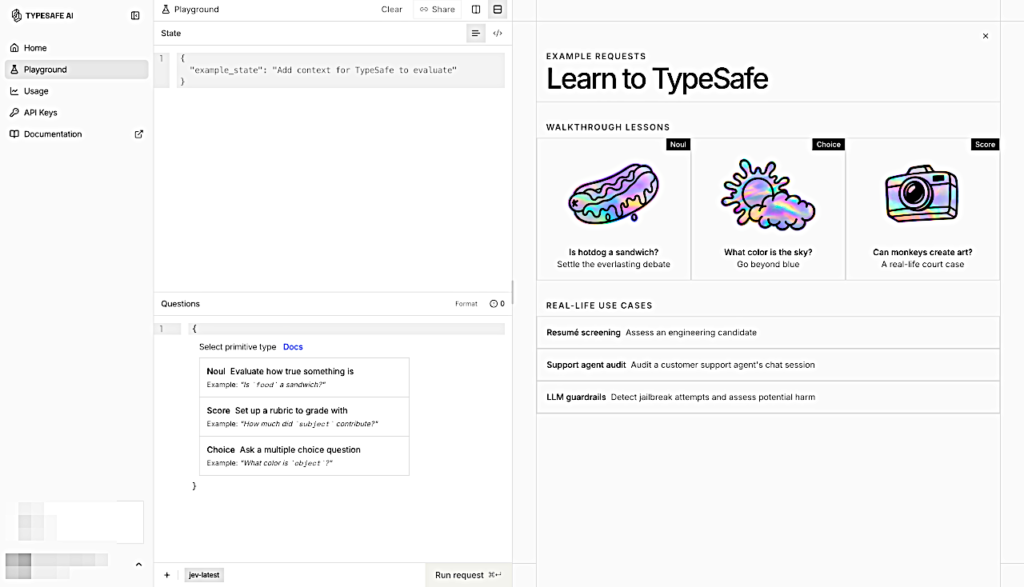
Jev 入門 : イントロダクション
Jev は TypeSafe のフラグシップモデルであり、初の System One モデルです。状態と型定義された (typed) 質問を送信するだけで; コードが直接利用できる、構造化された回答が得られます。
従来の大規模言語モデル(LLM)は、人間が読むためのテキストを生成するように設計されています。しかしながらコードが利用するための判断・判定 (judgment) をモデルに行わせようとする場合、そこにミスマッチが生じます: テキスト生成システムに構造化された意思決定 (decisions) を無理やり出力させ、その結果をコードが処理できる形式に解析し直す必要があるからです。
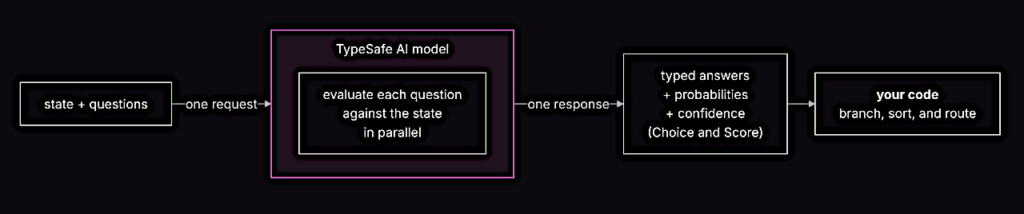
Jev は TypeSafe のフラグシップモデルであり、初の System One モデル です。System One モデルは、ソフトウェアが直接利用できる高速で構造化された意思決定を行うために構築されています。Jev は状態(state)に対して型付けされた質問を評価し、構造化された結果を直接返します。テキスト生成もパースも不要です。コード内でそのまま分岐・ソート・ルーティングに使える 型付きの値 と 確率分布 が入手できます。さらに、Choice (選択) や Score では信頼度( confidence )も返されるため、その回答をもとに処理を実行すべきか、どのように処理すべきかをコード側で判断して利用できます。
TypeSafe のプリミティブ
TypeSafe は、3つの AI プリミティブ を提供します。ソフトウェアのプリミティブと同様に、これらの AI プリミティブはモジュール化されており、組み合わせ可能で、構造化され、信頼性が高く、そして高速です。それぞれのプリミティブは異なる種類の質問を行い、異なる種類の回答を返します。
| 質問タイプ | 目的 | 返り値 |
|---|---|---|
| Choice | リストから選択肢を1つ選ぶ | choice, probabilities, confidence |
| Score | 評価基準 (rubric) に基づいて状態をスコアリング | score, probabilities, confidence |
| Noul (真偽確率) | この文 (statement) は真であるか? | noul (0–1) |
3つの質問タイプはすべて、単一の API 呼び出しの中で混在できます。すべての質問は、同一の状態 (state) に対して一度の処理で並列かつ独立して (in isolation) 評価されます。質問を追加しても、レスポンス時間はほとんど変わりません。また、各質問は独立して評価されるため、より多くの質問を追加してもコンテキストの劣化 (context-rot) を引き起こすことはありません。
コードで構成された、最小単位 (atomic) の質問
System One モデルは、各質問が範囲が限定された特定の事柄を問う場合に最も効果を上手く機能します。各質問は、直感的な (gut-check) 判断: 適切なコンテキストが与えられた場合に、高度な知識を持つ人が数秒で下せるような判断の類です。
尋ねたい質問が詳細な推論を必要とする場合や、複数の独立した要素を考慮する必要がある場合は、質問を分解してください。各要素を個別の質問として設定し、コード内のロジックで結果を組み合わせます。これにより、個々の評価の信頼性が維持され、各次元 (dimensions) の重み付け方法を完全に制御できます。
例えば、「このスタートアップのプレゼンテーションを評価してください」という質問の代わりに、市場規模、技術的な実現可能性、差別化について個別に質問します。そして、独自の計算式でこれらのスコアを組み合わせます。優先順位が変わった場合は、プロンプトを書き直すのではなく、コードの係数を変更してください。
Jev 入門 : クイックスタート
Try it: プレイグラウンド
- プレイグラウンド を開いて ログインします。
- state (状態) として 任意のテキストを 貼り付けてください。
サンプル状態
Hi, I've been trying to connect my Stripe account for 3 days and the integration keeps failing. I'm losing sales. Please help ASAP. - 質問を追加します。Noul の質問を試してみてください: “Does this message express urgency?”
{ "urgency": { "type": "noul", "instructions": "Does this message express urgency?" } } - さらに質問を追加できます。Noul、Choice、Score を1回の呼び出しで組み合わせて、すべての結果を一度に確認できます。
Call it: API
- ダッシュボード から API キーを取得してください。
- API エンドポイントに POST リクエストを送信してください。
- 詳細については、API リファレンス を参照 してください。
POST https://api.typesafe.ai/v1/systemone
Authorization: Bearer <API_KEY>
Content-Type: application/json
サンプル cURL コマンド
curl -X POST https://api.typesafe.ai/v1/systemone \
  -H "Authorization: Bearer $TYPESAFE_API_KEY" \
  -H "Content-Type: application/json" \
  -d @- <<'EOF'
  {
    "state": "Hi, I've been trying to connect my Stripe account for 3 days and the integration keeps failing. I'm losing sales. Please help ASAP.",
    "model": "jev-latest",
    "questions": {
      "urgency": {
        "type": "noul",
        "instructions": "Does this message express urgency?"
      }
    }
  }
EOF
レスポンス例
{
"model":"typesafe/jev-1.13-20260917",
"answers":{"urgency":{"type":"noul","noul":0.98}},
"usage":{"input_tokens":302,"output_tokens":21,"cost":0.000012684},
"id":"gen-dec-1791297653-YSE7OIeckYidEZYAj8jN",
"provider":"TypeSafe"
}
Request body
{
  "state": "Hi, I've been trying to connect my Stripe account for 3 days and the integration keeps failing. I'm losing sales. Please help ASAP.",
  "model": "jev-latest",
  "questions": {
    "department": {
      "type": "choice",
      "instructions": "Which team should handle this",
      "criteria": {
        "billing": "Payment or subscription issues",
        "technical": "Bugs or integration problems",
        "sales": "Pricing or account questions"
      }
    },
    "frustration": {
      "type": "score",
      "instructions": "How frustrated the customer appears",
      "criteria": [
        "Calm, just stating facts",
        "Frustrated but civil",
        "Very angry, strong language"
      ]
    },
    "is_urgent": {
      "type": "noul",
      "instructions": "The message conveys urgency or time-sensitivity"
    }
  }
}
Response body
{
  "model": "jev-1.13.0",
  "answers": {
    "department": {
      "type": "choice",
      "choice": "technical",
      "confidence": 0.78,
      "probabilities": {
        "technical": 0.85,
        "sales": 0.0,
        "billing": 0.15
      }
    },
    "frustration": {
      "type": "score",
      "score": 1.0,
      "confidence": 1.0,
      "legend": {
        "0": "Calm, just stating facts",
        "1": "Frustrated but civil",
        "2": "Very angry, strong language"
      },
      "probabilities": {
        "0": 0.0,
        "1": 1.0,
        "2": 0.0
      }
    },
    "is_urgent": {
      "type": "noul",
      "noul": 1.0
    }
  },
  "usage": {
    "input_tokens": 392,
    "output_tokens": 65
  }
}
See the API Reference for all the details.
Code it: Python SDK
- SDK をインストールします (requires Python >= 3.10)。
# with pip pip install typesafe-sdk # with uv uv add typesafe-sdk - SDK を使用します。クライアントは環境変数から TYPESAFE_API_KEY を読み取り、デフォルトで jev-latest を呼び出します。
from typesafe_sdk import Choice, Noul, Score, TypeSafeClient

client = TypeSafeClient()

ticket = "Hi, I've been trying to connect my Stripe account for 3 days and the integration keeps failing. I'm losing sales. Please help ASAP."

response = client.system_one(
    state=ticket,
    questions={
        "department": Choice(
            instructions="Which team should handle this",
            criteria={
                "billing": "Payment or subscription issues",
                "technical": "Bugs or integration problems",
                "sales": "Pricing or account questions",
            },
        ),
        "frustration": Score(
            instructions="How frustrated the customer appears",
            criteria=[
                "Calm, just stating facts",
                "Frustrated but civil",
                "Very angry, strong language",
            ],
        ),
        "is_urgent": Noul(
            instructions="The message conveys urgency or time-sensitivity",
        ),
    },
)

print(response.answers["department"].choice)  # "technical"
print(response.answers["frustration"].score)  # 1.0
print(response.answers["is_urgent"].noul)     # 1.0
See client SDKs for installation options and detailed usage.
以上