LangGraph は2025年10月にバージョン 1.0 がリリースされましたが、その後も改良が加えられて現在では 1.1 が公開されています。
このクイックスタートは LangGraph Graph API または Functional API を使用して、計算機エージェントを構築する方法を紹介します。
LangGraph 1.1 : Get Started – クイックスタート
作成 : クラスキャット・セールスインフォメーション
作成日時 : 04/07/2026
バージョン : 1.1.6
* 本記事は docs.langchain.com の以下のページを参考にしています :
* サンプルコードの動作確認はしておりますが、必要な場合には適宜、追加改変しています。
LangGraph 1.1 : Get Started – クイックスタート
クイックスタートは LangGraph Graph API または Functional API を使用して、計算機エージェントを構築する方法を紹介します。
💡 AI コーディングアシスタントをご利用ですか?
- LangChain Docs MCP サーバ をインストールして、エージェントが最新の LangChain ドキュメントとサンプルにアクセスできるようにしましょう。
- LangChain Skills をインストールして、LangChain エコシステムタスクにおけるエージェントのパフォーマンスを向上させましょう。
- エージェントをノードとエッジのグラフとして定義したい場合には、Graph API を使用します。
- エージェントを単一の関数として定義したい場合には、Functional API を使用します。
For conceptual information, see Graph API overview and Functional API overview.
Graph API の使用
準備
%pip install -U -q langgraph "langchain[anthropic]"
1. ツールとモデルの定義
この例では、Claude Sonnet 4.6 モデルを使用して、加算、乗算、除算のためのツールを定義します。
from langchain.tools import tool
from langchain.chat_models import init_chat_model


model = init_chat_model(
    "claude-sonnet-4-6",
    temperature=0
)


# Define tools
@tool
def multiply(a: int, b: int) -> int:
    """Multiply `a` and `b`.

    Args:
        a: First int
        b: Second int
    """
    return a * b


@tool
def add(a: int, b: int) -> int:
    """Adds `a` and `b`.

    Args:
        a: First int
        b: Second int
    """
    return a + b


@tool
def divide(a: int, b: int) -> float:
    """Divide `a` and `b`.

    Args:
        a: First int
        b: Second int
    """
    return a / b


# Augment the LLM with tools
tools = [add, multiply, divide]
tools_by_name = {tool.name: tool for tool in tools}
model_with_tools = model.bind_tools(tools)
2. 状態の定義
グラフの状態は、メッセージと LLM 呼び出しの回数を保存するために使用されます。
💡 LangGraph の状態は、エージェントの実行全体を通して保持 (persist) されます。
operator.add を伴う Annotated 型は、新しいメッセージが既存のリストを置き換えるのではなく、追加されることを保証します。
from langchain.messages import AnyMessage
from typing_extensions import TypedDict, Annotated
import operator


class MessagesState(TypedDict):
    messages: Annotated[list[AnyMessage], operator.add]
    llm_calls: int
3. モデルノードの定義
モデルノードは、LLM を呼び出し、ツールを呼び出すかどうかを決定するために使用されます。
from langchain.messages import SystemMessage


def llm_call(state: dict):
    """LLM decides whether to call a tool or not"""

    return {
        "messages": [
            model_with_tools.invoke(
                [
                    SystemMessage(
                        content="You are a helpful assistant tasked with performing arithmetic on a set of inputs."
                    )
                ]
                + state["messages"]
            )
        ],
        "llm_calls": state.get('llm_calls', 0) + 1
    }
4. ツールノードの定義
ツールノードは、ツールを呼び出して結果を返すために使用されます。
from langchain.messages import ToolMessage


def tool_node(state: dict):
    """Performs the tool call"""

    result = []
    for tool_call in state["messages"][-1].tool_calls:
        tool = tools_by_name[tool_call["name"]]
        observation = tool.invoke(tool_call["args"])
        result.append(ToolMessage(content=observation, tool_call_id=tool_call["id"]))
    return {"messages": result}
5. 終端 (end) ロジックの定義
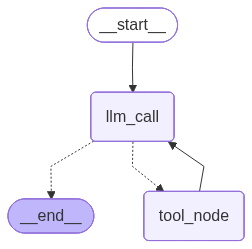
条件分岐エッジ関数 (conditional edge function) は、LLM がツール呼び出しを行ったかどうかに基づいて、ツールノードまたは終端 (end) にルーティングするために使用されます。
from typing import Literal
from langgraph.graph import StateGraph, START, END


def should_continue(state: MessagesState) -> Literal["tool_node", END]:
    """Decide if we should continue the loop or stop based upon whether the LLM made a tool call"""

    messages = state["messages"]
    last_message = messages[-1]

    # If the LLM makes a tool call, then perform an action
    if last_message.tool_calls:
        return "tool_node"

    # Otherwise, we stop (reply to the user)
    return END
6. エージェントの構築とコンパイル
エージェントは、StateGraph クラスを使用して構築され、compile メソッドを使用してコンパイルされます。
# Build workflow
agent_builder = StateGraph(MessagesState)

# Add nodes
agent_builder.add_node("llm_call", llm_call)
agent_builder.add_node("tool_node", tool_node)

# Add edges to connect nodes
agent_builder.add_edge(START, "llm_call")
agent_builder.add_conditional_edges(
    "llm_call",
    should_continue,
    ["tool_node", END]
)
agent_builder.add_edge("tool_node", "llm_call")

# Compile the agent
agent = agent_builder.compile()

# Show the agent
from IPython.display import Image, display
display(Image(agent.get_graph(xray=True).draw_mermaid_png()))

# Invoke
from langchain.messages import HumanMessage
messages = [HumanMessage(content="Add 3 and 4.")]
messages = agent.invoke({"messages": messages})
for m in messages["messages"]:
    m.pretty_print()
出力例
================================ Human Message =================================

3 と 4 を足します。
================================== Ai Message ==================================

[{'text': '3と4を足す計算を実行します。', 'type': 'text'}, {'id': 'toolu_01UunbEbTQxPM7TtMrtJuNaL', 'input': {'a': 3, 'b': 4}, 'name': 'add', 'type': 'tool_use'}]
Tool Calls:
  add (toolu_01UunbEbTQxPM7TtMrtJuNaL)
 Call ID: toolu_01UunbEbTQxPM7TtMrtJuNaL
  Args:
    a: 3
    b: 4
================================= Tool Message =================================

7
================================== Ai Message ==================================

3と4を足した結果は7です。
Congratulations! You’ve built your first agent using the LangGraph Graph API.
Full code example
# Step 1: Define tools and model

from langchain.tools import tool
from langchain.chat_models import init_chat_model


model = init_chat_model(
    "claude-sonnet-4-6",
    temperature=0
)


# Define tools
@tool
def multiply(a: int, b: int) -> int:
    """Multiply `a` and `b`.

    Args:
        a: First int
        b: Second int
    """
    return a * b


@tool
def add(a: int, b: int) -> int:
    """Adds `a` and `b`.

    Args:
        a: First int
        b: Second int
    """
    return a + b


@tool
def divide(a: int, b: int) -> float:
    """Divide `a` and `b`.

    Args:
        a: First int
        b: Second int
    """
    return a / b


# Augment the LLM with tools
tools = [add, multiply, divide]
tools_by_name = {tool.name: tool for tool in tools}
model_with_tools = model.bind_tools(tools)

# Step 2: Define state

from langchain.messages import AnyMessage
from typing_extensions import TypedDict, Annotated
import operator


class MessagesState(TypedDict):
    messages: Annotated[list[AnyMessage], operator.add]
    llm_calls: int

# Step 3: Define model node
from langchain.messages import SystemMessage


def llm_call(state: dict):
    """LLM decides whether to call a tool or not"""

    return {
        "messages": [
            model_with_tools.invoke(
                [
                    SystemMessage(
                        content="You are a helpful assistant tasked with performing arithmetic on a set of inputs."
                    )
                ]
                + state["messages"]
            )
        ],
        "llm_calls": state.get('llm_calls', 0) + 1
    }


# Step 4: Define tool node

from langchain.messages import ToolMessage


def tool_node(state: dict):
    """Performs the tool call"""

    result = []
    for tool_call in state["messages"][-1].tool_calls:
        tool = tools_by_name[tool_call["name"]]
        observation = tool.invoke(tool_call["args"])
        result.append(ToolMessage(content=observation, tool_call_id=tool_call["id"]))
    return {"messages": result}

# Step 5: Define logic to determine whether to end

from typing import Literal
from langgraph.graph import StateGraph, START, END


# Conditional edge function to route to the tool node or end based upon whether the LLM made a tool call
def should_continue(state: MessagesState) -> Literal["tool_node", END]:
    """Decide if we should continue the loop or stop based upon whether the LLM made a tool call"""

    messages = state["messages"]
    last_message = messages[-1]

    # If the LLM makes a tool call, then perform an action
    if last_message.tool_calls:
        return "tool_node"

    # Otherwise, we stop (reply to the user)
    return END

# Step 6: Build agent

# Build workflow
agent_builder = StateGraph(MessagesState)

# Add nodes
agent_builder.add_node("llm_call", llm_call)
agent_builder.add_node("tool_node", tool_node)

# Add edges to connect nodes
agent_builder.add_edge(START, "llm_call")
agent_builder.add_conditional_edges(
    "llm_call",
    should_continue,
    ["tool_node", END]
)
agent_builder.add_edge("tool_node", "llm_call")

# Compile the agent
agent = agent_builder.compile()


from IPython.display import Image, display
# Show the agent
display(Image(agent.get_graph(xray=True).draw_mermaid_png()))

# Invoke
from langchain.messages import HumanMessage
messages = [HumanMessage(content="Add 3 and 4.")]
messages = agent.invoke({"messages": messages})
for m in messages["messages"]:
    m.pretty_print()
以上