Zero はエージェント向けのプログラミング言語です。今すぐ試す最も簡単な方法は、最新のコンパイラをインストールして、簡単なプログラムを実行することです。
Zero 入門 : Getting Started
作成 : クラスキャット・セールスインフォメーション
作成日時 : 05/21/2026
バージョン : v0.1.3
* 本記事は zerolang.ai の以下のページを参考にしています :
* サンプルコードの動作確認はしておりますが、必要な場合には適宜、追加改変しています。

◆ お問合せ : 下記までお願いします。
- クラスキャット セールス・インフォメーション
- sales-info@classcat.com
- ClassCatJP
Zero 入門 : Getting Started
Zero はエージェント向けのプログラミング言語です。今すぐ試す最も簡単な方法は、最新のコンパイラをインストールして、簡単なプログラムを実行することです。
コンパイラのインストール
curl -fsSL https://zerolang.ai/install.sh | bash
export PATH="$HOME/.zero/bin:$PATH"
zero --version
インストーラーは、GitHub リリースから最新の一致するバイナリをダウンロードし、$HOME/.zero/bin/zero にそれを書き込みます。
Check Your First File
hello.0 を作成します :
pub fun main(world: World) -> Void raises {
    check world.out.write("hello from zero\n")
}
チェッカーを実行します :
zero check hello.0
出力例
ok
重要な部分は以下の通りです :
- `pub fun main(…)` はプログラムのエントリポイントを宣言します。
- `world : World` はランタイムによりプログラムに渡される権限 (能力、capability) オブジェクトです。
- `world.out.write(…)` は、明示的に与えられた権限を通じて出力を書き込みます。
- `check` は、エラーが発生する可能性のある処理を扱います。
- `raise` は、`main` がエラーを返す可能性があることを示します。
Zero は副作用 (effects)を可視化する。出力を書き込むプログラムは、隠されたグローバルプロセス・オブジェクトを読み込む代わりに、World を要求します。
実行可能ファイルの作成と実行
add.0 を作成します :
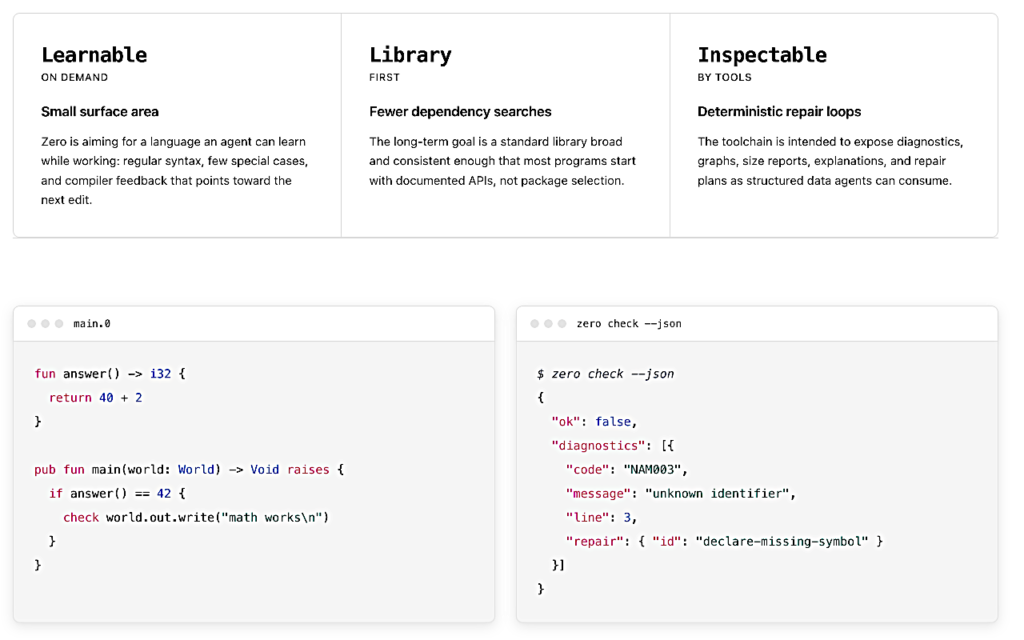
fun answer() -> i32 {
    return 40 + 2
}

pub fun main(world: World) -> Void raises {
    let value = answer()
    if value == 42 {
        check world.out.write("math works\n")
    } else {
        check world.out.write("math broke\n")
    }
}
実行します :
zero run add.0
出力例
math works
この例では、ヘルパー関数、ローカル・バインディング、および if / else を導入しています。
パッケージの作成
プロジェクトのワークフローは、`zero new` から始まります :
zero new cli hello
cd hello
zero check .
zero test .
zero run .
zero build --target linux-musl-x64 --out .zero/out/hello .
出力例 – 動作環境: macOS Tahoe 26.5 (M2)
% zero check .
ok

% zero test .
1 test(s) ok

% zero run .
hello from zero

% zero build --target linux-musl-x64 --out .zero/out/hello .
.zero/out/hello (289 B, 5 ms)

% .zero/out/hello
zsh: exec format error: .zero/out/hello
※ 訳注: ターゲットが macOS (M2) の場合は、`–target darwin-arm64` を使用します :
zero build --target darwin-arm64 --out .zero/out/hello .
出力例
% zero build --target darwin-arm64 --out .zero/out/hello .
.zero/out/hello (16.2 KiB, 5 ms)

% .zero/out/hello
hello from zero
ℹ️ 単一ファイルは学習には便利ですが、実際の Zero プロジェクトでは zero.json マニフェストと src/ 下のソース・ファイルを使用します :
% tree hello
hello
├── README.md
├── src
│   ├── lib.0
│   └── main.0
└── zero.json
{
  "package": {
    "name": "hello",
    "version": "0.1.0",
    "license": "MIT"
  },
  "targets": {
    "cli": {
      "kind": "exe",
      "main": "src/main.0",
      "defaultTarget": "linux-musl-x64",
      "devTarget": "host",
      "releaseProfile": "release-small"
    }
  },
  "deps": {},
  "profiles": {
    "dev": { "inherits": "dev" },
    "release-small": { "inherits": "release-small" }
  },
  "docs": {
    "readme": "README.md",
    "examples": ["src/main.0"]
  }
}
基本構文の学習
以下の例を順番に見ていきましょう :
zero check examples/hello.0
zero check examples/hello-let.0
zero check examples/functions.0
zero check examples/branch.0
zero check examples/point.0
zero check examples/result-choice.0
出力例
ok
ok
ok
ok
ok
ok
これらは以下をカバーしています :
- エントリポイントと出力
- let バインディング
- 関数と戻り値
- 条件分岐
- shape データ宣言
- enum, choice, match
パッケージの調査
CLI パッケージの例は examples/systems-package にあります :
% tree examples/systems-package
examples/systems-package
├── src
│   ├── helpers.0
│   ├── main.0
│   └── types.0
└── zero.json

2 directories, 4 files
Check it:
zero check examples/systems-package
出力例
ok
そのモジュールグラフを調べます :
zero graph --json examples/systems-package
出力例
% zero graph --json examples/systems-package | head -10
{
  "schemaVersion": 1,
  "sourceFile": "examples/systems-package/src/main.0",
  "targets": [{"name":"cli","kind":"exe","main":"examples/systems-package/src/main.0"}],
  "package": {"name":"systems-package","version":"0.1.0","root":"examples/systems-package","manifestPath":"examples/systems-package/zero.json","manifestHash":"cbdabba39f40c30f","dependencyGraphHash":"fb0496c3349c5315","lockfile":{"format":"zero-lock-v1","path":".zero/package-locks/fb0496c3349c5315.lock.json","hash":"87286a4863b12153","generated":true},"resolver":{"deterministic":true,"registryReadyMetadata":true,"remoteFetch":false,"versionSolver":"exact-version-or-path"},"dependencies":[]},
  "packageCache": {"cacheKeyInputs":{"compilerVersion":"0.1.3","target":"darwin-arm64","packageVersion":"0.1.0","dependencyGraphHash":"fb0496c3349c5315","manifestHash":"cbdabba39f40c30f","lockfileHash":"87286a4863b12153"},"invalidationReasons":["source changed","manifest changed","dependency graph changed","target changed","profile changed","compiler version changed"],"profile":"release"},
  "targetSupport": {"target":"darwin-arm64","hostTarget":"darwin-arm64","hosted":true,"fsAvailable":true,"capabilities":["args", "env", "fs", "memory", "time", "rand", "net", "proc"],"requiredCapabilitySupport":{"status":"supported","missingCapabilities":[]},"httpRuntime":{"status":"supported","provider":"curl","providerLink":"system-library","tlsBoundary":"platform-or-c-library","caSource":"provider-default","tlsVerification":true,"customCa":{"supported":true,"mode":"test-harness","env":"ZERO_HTTP_TEST_CA_BUNDLE"},"insecureMode":false,"protocols":["http","https"],"staticLibraries":["zero_runtime.o","zero_http_curl.o"],"systemLibraries":["curl"],"reason":"host direct runtime link plan uses libcurl with verification enabled"}},
  "requiresCapabilities": ["codec", "parse", "time", "world"],
  "selfHostSubset": {"contractVersion":1,"stage":"compiler-substrate-stage1","compatible":false,"target":"wasm32-web","backend":"direct-wasm","selectedTarget":"darwin-arm64","allowedCapabilities":["memory","alloc","path","codec","parse","args","env","World.stdout","World.stderr"],"cInterop":{"headerImports":false,"typedBindings":false,"generatedCRequired":false,"externalCallBoundary":"direct-abi-audit"},"blockedReasons":["time"],"sourceForms":["package-local-modules","functions","while","if","return","fixed-arrays","primitive-locals","shape","enum","minimal-choice","strings","byte-spans","fallibility","explicit-alloc"],"featureFacts":{"strings":{"status":"direct-wasm-lowered","representation":"readonly-data-ptr-len","indexing":"bounds-checked-u8","slicing":"bounds-checked-byte-view","dataSegments":true},"spans":{"status":"direct-wasm-lowered","readonlyRepresentation":"ptr-len","mutableRepresentation":"ptr-len-mutspan-u8","helpers":["std.mem.len","std.mem.eqlBytes","std.mem.copy","std.mem.fill","std.mem.peekByte","std.mem.pokeByte"]},"aggregates":{"shape":"staged","enum":"staged","choice":"staged","directWasmLowering":false},"fallibility":{"status":"staged","directWasmLowering":false},"containers":{"status":"staged-explicit-storage","directWasmLowering":false},"generics":{"status":"staged-concrete-specializations-only","runtimeMetadata":false}},"targetLimitations":["no-host-fs","no-subprocesses","hosted-runtime-limited-to-world-stdio","external-c-calls-require-target-library-audit"]},
  "selfHostRouting": {"contractVersion":1,"subsetCompatible":false,"mode":"native-bootstrap","phases":{"parse":"zero-c","check":"zero-c","lower":"zero-c","emit":"zero-c","selfHostCompiler":"compiler-zero","selfHostCompilerRole":"not-used"},"frontend":{"selected":false,"implementation":"compiler-zero","status":"not-selected"},"wasmEmitter":{"selected":false,"implementation":"compiler-zero-direct-wasm","status":"not-selected"},"metadata":{"graphJson":false,"sizeJson":false},"cBridge":{"required":false,"policy":"removed","explicitDirectFallback":"never-c-bridge"}},
マニフェストは、エントリーポイントがどこにあるか Zero に知らせます :
{
  "package": { "name": "systems-package", "version": "0.1.0" },
  "targets": { "cli": { "kind": "exe", "main": "src/main.0" } }
}
以上