エージェントとは、ツールを使用してタスクを達成する AI プログラムです。
エージェントは、ステートレスモデルを基盤とするステートフルな制御ループです。モデルは指示に従って、ループ内で推論を行い、ツールを呼び出します。必要に応じて、メモリ、ナレッジ、ストレージ、human-in-the-loop、およびガードレールを追加できます。
Agno 再入門 : SDK – 基本 : エージェント
作成 : クラスキャット・セールスインフォメーション
作成日時 : 05/29/2026
バージョン : v2.6.9
* 本記事は docs.agno.com の以下のページを参考にしています :
- SDK – Basics : Agents – What are Agents?
- SDK – Basics : Agents – Building Agents
- SDK – Basics : Agents – Running Agents
- SDK – Basics : Agents – Debugging Agents
* サンプルコードの動作確認はしておりますが、必要な場合には適宜、追加改変しています。

◆ お問合せ : 下記までお願いします。
- クラスキャット セールス・インフォメーション
- sales-info@classcat.com
- ClassCatJP
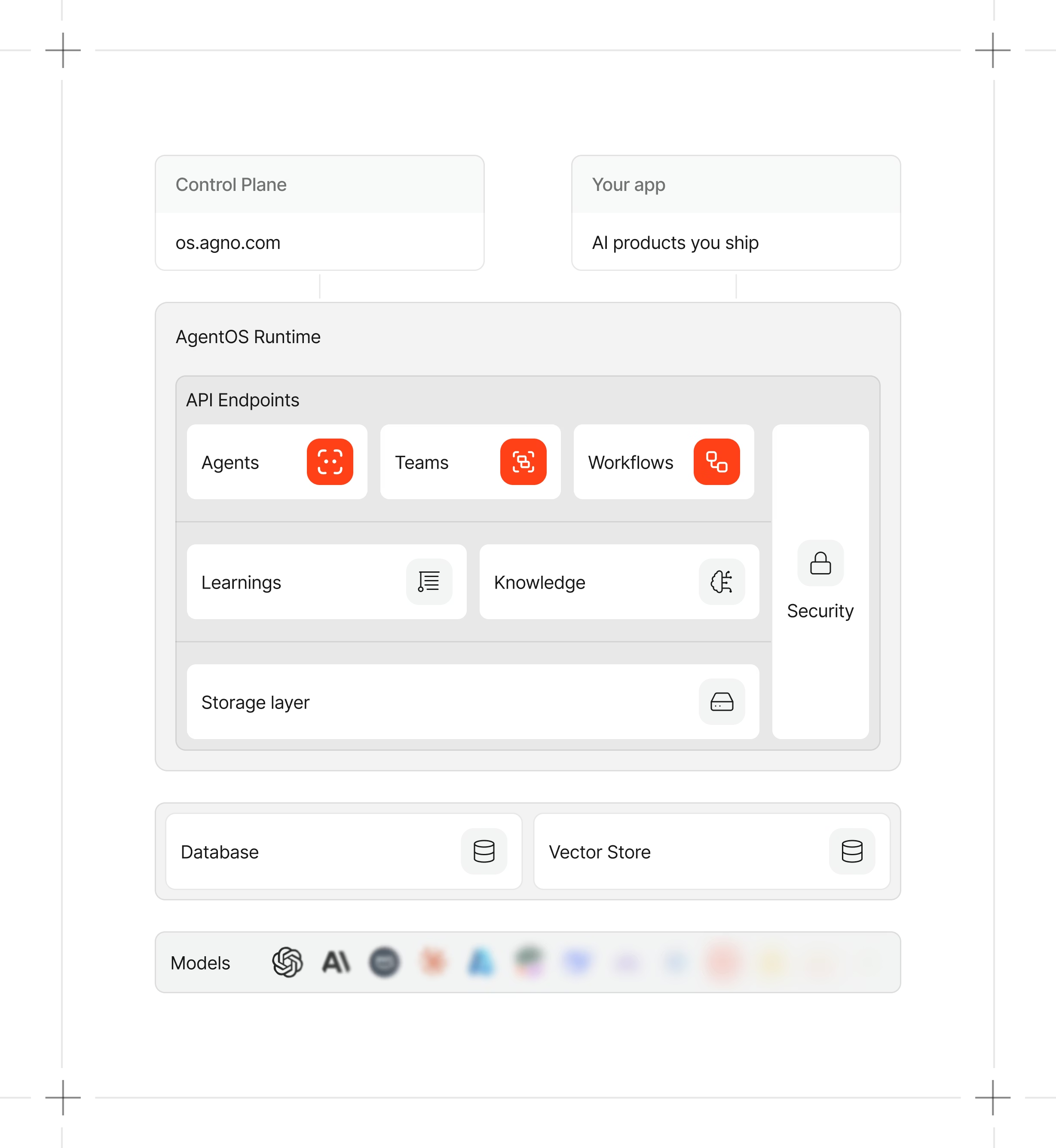
Agno 再入門 : SDK – 基本 : エージェント
What are Agents?
エージェントとは、ツールを使用してタスクを達成する AI プログラムです。
エージェントは、ステートレスモデルを基盤とするステートフルな制御ループです。モデルは指示に従って、ループ内で推論を行い、ツールを呼び出します。必要に応じて、メモリ、ナレッジ、ストレージ、human-in-the-loop、およびガードレールを追加できます。
エージェントの構築
効果的なエージェントを構築するため、まず単純なもの: モデル、ツール、指示から始めます。それがうまく機能したら、必要に応じて機能を追加していきます。例えば、HackerNews にアクセスできる最も単純なエージェントは次のようになります :
hackernews_agent.py
from agno.agent import Agent
from agno.models.anthropic import Claude
from agno.tools.hackernews import HackerNewsTools

agent = Agent(
    model=Claude(id="claude-sonnet-4-5"),
    tools=[HackerNewsTools()],
    instructions="Write a report on the topic. Output only the report.",
    markdown=True,
)
agent.print_response("Trending startups and products.", stream=True)
エージェントの実行
開発環境では、Agent.print_response() を使用してください。レスポンスがターミナルに読みやすい形式で表示されます。
本番環境では、Agent.run() または Agent.arun() を使用してください :
from typing import Iterator
from agno.agent import Agent, RunOutputEvent, RunEvent
from agno.models.anthropic import Claude
from agno.tools.hackernews import HackerNewsTools

agent = Agent(
    model=Claude(id="claude-sonnet-4-5"),
    tools=[HackerNewsTools()],
    instructions="Write a report on the topic. Output only the report.",
    markdown=True,
)

# Stream the response
stream: Iterator[RunOutputEvent] = agent.run("Trending products", stream=True)
for chunk in stream:
    if chunk.event == RunEvent.run_content:
        print(chunk.content)
呼び出し可能なファクトリ
ツールやナレッジについて、静的なリストではなく関数を渡します。この関数は各実行の開始時に呼び出されるため、ツールセットや知識ベースはユーザー、またはセッション毎に変更できます。
callable_tools.py
from agno.agent import Agent
from agno.models.openai import OpenAIResponses
from agno.run import RunContext
from agno.tools.duckduckgo import DuckDuckGoTools
from agno.tools.yfinance import YFinanceTools


def get_tools(run_context: RunContext):
    role = (run_context.session_state or {}).get("role", "general")
    if role == "finance":
        return [YFinanceTools()]
    return [DuckDuckGoTools()]


agent = Agent(
    model=OpenAIResponses(id="gpt-5-mini"),
    tools=get_tools,
)

agent.print_response("AAPL stock price?", session_state={"role": "finance"}, stream=True)
agent.print_response("Latest AI news?", session_state={"role": "general"}, stream=True)
呼び出し可能キャッシュ設定
ファクトリの結果はデフォルトでキャッシュされます。キャッシュキーは、カスタムキー関数 > user_id > session_id の順に解決されます。いずれも利用できない場合は、キャッシュはスキップされ、ファクトリは毎回実行されます。
- 設定 (デフォルト) – 説明
- cache_callables (True) – すべての呼び出し可能なファクトリのキャッシュを有効または無効にします。
- callable_tools_cache_key (None) – ツールファクトリのためのカスタムキャッシュキー関数
- callable_knowledge_cache_key (None) – ナレッジファクトリのためのカスタムキャッシュキー関数
- callable_members_cache_key (None) – メンバーファクトリのためのカスタムキャッシュキー関数 (チームのみ)
実行間で session_state が変更された場合は、cache_callables=False に設定してください。ファクトリは毎回再評価する必要があります。
キャッシュされた結果をプログラムでクリアします :
from agno.utils.callables import clear_callable_cache

clear_callable_cache(team)                            # Clear all caches
clear_callable_cache(team, kind="tools")              # Clear tools cache only
clear_callable_cache(team, kind="tools", close=True)  # Clear and call .close() on cached resources
Use aclear_callable_cache() in async code.
エージェントの実行
エージェントを実行し、その出力を処理します。
エージェントを実行するには、Agent.run() または Agent.arun() を呼び出します。実行フローは以下のとおりです :
- エージェントは、モデルに送信するコンテキストを構築します (システムメッセージ、ユーザーメッセージ、チャット履歴、ユーザーメモリ、セッション状態、その他の関連入力)。
- エージェントはこのコンテキストをモデルに送信します。
- モデルはメッセージまたはツール呼び出しのいずれかで応答します。
- モデルがツール呼び出しを行う場合、エージェントはそれを実行し、結果をモデルに返します。
- モデルは更新されたコンテキストを処理し、ツール呼び出しのない最終メッセージを生成するまでこのループを繰り返します。
- エージェントはこの最終レスポンスを呼び出し元に返します。
基本的な実行
Agent.run() は RunOutput オブジェクトを返します。`stream=True` の場合は、RunOutputEvent オブジェクトのストリームを返します。
from agno.agent import Agent, RunOutput
from agno.models.anthropic import Claude
from agno.tools.hackernews import HackerNewsTools
from agno.utils.pprint import pprint_run_response

agent = Agent(
    model=Claude(id="claude-sonnet-4-5"),
    tools=[HackerNewsTools()],
    instructions="Write a report on the topic. Output only the report.",
    markdown=True,
)

# Run agent and return the response as a variable
response: RunOutput = agent.run("Trending startups and products.")

# Print the response in markdown format
pprint_run_response(response, markdown=True)
ℹ️ Run the agent asynchronously using Agent.arun().
Run Input
`input` パラメータは、文字列、リスト、辞書、メッセージ、Pydantic モデル、またはメッセージのリストのいずれかです :
from agno.agent import Agent, RunOutput
from agno.models.anthropic import Claude
from agno.tools.hackernews import HackerNewsTools
from agno.utils.pprint import pprint_run_response

agent = Agent(
    model=Claude(id="claude-sonnet-4-5"),
    tools=[HackerNewsTools()],
    instructions="Write a report on the topic. Output only the report.",
    markdown=True,
)

# Run agent with input="Trending startups and products."
response: RunOutput = agent.run(input="Trending startups and products.")
# Print the response in markdown format
pprint_run_response(response, markdown=True)
See Input & Output for structured input and output.
Run Output
Agent.run() は、ストリーミングを行わない場合、RunOutput オブジェクトを返します。主な属性は :
- run_id: 実行の ID。
- agent_id: エージェントの ID。
- agent_name: エージェントの名前。
- session_id: セッションの ID。
- user_id:ユーザーID。
- content:レスポンスのコンテンツ。
- content_type: コンテンツの種類。構造化出力の場合、これは Pydantic モデルのクラス名です。
- reasoning_content: 推論内容。
- messages: モデルに送信されたメッセージのリスト。
- metrics: 実行結果のメトリクス。See Metrics.
- model: 実行に使用されたモデル。
See RunOutput reference for full documentation.
ストリーミング
`stream=True` を設定すると、RunOutputEvent オブジェクトのイテレータが返されます :
from typing import Iterator
from agno.agent import Agent, RunOutputEvent, RunEvent
from agno.models.anthropic import Claude
from agno.tools.hackernews import HackerNewsTools

agent = Agent(
    model=Claude(id="claude-sonnet-4-5"),
    tools=[HackerNewsTools()],
    instructions="Write a report on the topic. Output only the report.",
    markdown=True,
)

# Run agent and return the response as a stream
stream: Iterator[RunOutputEvent] = agent.run("Trending products", stream=True)
for chunk in stream:
    if chunk.event == RunEvent.run_content:
        print(chunk.content)
ストリーミング・イベント
デフォルトでは、RunContent イベント (モデル応答) のみがストリーミングされます。
すべてのイベント(ツール呼び出し、推論、メモリ更新など)をストリーミングするには、stream_events=Trueを 設定してください。
response_stream: Iterator[RunOutputEvent] = agent.run(
    "Trending products",
    stream=True,
    stream_events=True
)
イベントの処理
イベントが発生したらすぐに処理します :
from agno.agent import Agent, RunEvent
from agno.models.anthropic import Claude
from agno.tools.hackernews import HackerNewsTools

agent = Agent(
    model=Claude(id="claude-sonnet-4-5"),
    tools=[HackerNewsTools()],
    instructions="Write a report on the topic. Output only the report.",
    markdown=True,
)

stream = agent.run("Trending products", stream=True, stream_events=True)

for chunk in stream:
    if chunk.event == RunEvent.run_content:
        print(f"Content: {chunk.content}")
    elif chunk.event == RunEvent.tool_call_started:
        print(f"Tool call started: {chunk.tool.tool_name}")
    elif chunk.event == RunEvent.reasoning_step:
        print(f"Reasoning step: {chunk.reasoning_content}")
✔ RunEvents を使用すると、エージェントの内部プロセスを完全に可視化でき、リッチな UI フィードバックとデバッグが可能になります。
イベントの種類
エージェントの設定に応じて、Agent.run() および Agent.arun() によって生成されるイベント:
コアイベント
- RunStarted – 実行の開始を示します。
- RunContent – モデルの応答テキストを個別のチャンクとして格納します。
- RunContentCompleted – コンテンツ・ストリーミングの完了を知らせます (signal)。
- RunIntermediateContent – モデルの中間応答テキストを個別のチャンクとして格納します。output_model が設定されている場合に使用されます。
- RunCompleted – 実行が正常に完了したことを知らせます。
- RunError – 実行中にエラーが発生したことを示します。
- RunCancelled – 実行がキャンセルされたことを知らせます。
制御フローイベント
- RunPaused – 実行が一時停止されていることを示します。
- RunContinued – 一時停止されていた実行が再開されたことを知らせます。
ツールイベント
- ToolCallStarted – ツール呼び出しの開始を示します。
- ToolCallCompleted – ツール呼び出しの結果を含む、ツール呼び出しの完了を知らせます。
推論イベント
- ReasoningStarted – エージェントの推論プロセスの開始を示します。
- ReasoningStep – 推論プロセスの単一のステップを含みます。
- ReasoningCompleted – 推論プロセスの完了を知らせます。
メモリイベント
- MemoryUpdateStarted – エージェントがメモリを更新中であることを示します。
- MemoryUpdateCompleted – メモリ更新が完了したことを知らせます。
セッション要約 (Summary) イベント
- SessionSummaryStarted – セッション要約生成の開始を示します。
- SessionSummaryCompleted:セッション要約生成の完了を知らせます。
プリフック・イベント
- PreHookStarted – 実行前フックの開始を示します。
- PreHookCompleted – 実行前フックの実行完了を知らせます。
ポストフック・イベント
- PostHookStarted – 実行後フックの開始を示します。
- PostHookCompleted – 実行後フックの実行完了を知らせます。
パーサーモデル・イベント
- ParserModelResponseStarted – パーサーモデル応答の開始を示します。
- ParserModelResponseCompleted – パーサーモデル応答の完了を知らせます。
出力モデル・イベント
- OutputModelResponseStarted – 出力モデル応答の開始を示します。
- OutputModelResponseCompleted – 出力モデル応答の完了を知らせます。
カスタム・イベント
CustomEvent を拡張してカスタムイベントを作成します :
from dataclasses import dataclass
from agno.run.agent import CustomEvent
from typing import Optional

@dataclass
class CustomerProfileEvent(CustomEvent):
    """CustomEvent for customer profile."""

    customer_name: Optional[str] = None
    customer_email: Optional[str] = None
    customer_phone: Optional[str] = None
ツールからカスタムイベントを生成します (yield) :
from agno.tools import tool

@tool()
async def get_customer_profile():
    """Example custom tool that simply yields a custom event."""

    yield CustomerProfileEvent(
        customer_name="John Doe",
        customer_email="john.doe@example.com",
        customer_phone="1234567890",
    )
実行ユーザとセッションの指定
user_id と session_id を渡すことで、実行を特定のユーザーとセッションに関連付けることができます :
agent.run("Tell me a 5 second short story about a robot", user_id="john@example.com", session_id="session_123")
See Agent Sessions for more details.
画像 / 音声 / 動画 / ファイルの受け渡し
images, audio, video, または files パラメータを介してメディアを渡します :
agent.run("Tell me a 5 second short story about this image", images=[Image(url="https://example.com/image.jpg")])
See Multimodal Agents for more details.
出力スキーマの受け渡し
構造化出力のための出力スキーマを渡します :
from pydantic import BaseModel
from agno.agent import Agent
from agno.models.openai import OpenAIResponses

class TVShow(BaseModel):
    title: str
    episodes: int

agent = Agent(model=OpenAIResponses(id="gpt-5.2"))
agent.run("Create a TV show", output_schema=TVShow)
See Input & Output for more details.
実行の一時停止と再開
human-in-the-loop フローのためにエージェントの実行を一時停止できます。実行を再開するには、Agent.continue_run() を使用します。
See Human-in-the-Loop for more details.
実行のキャンセル
Agent.cancel_run() を使用して実行をキャンセルできます。
See Cancelling a Run for more details.
バックグラウンド実行
`background=True` を指定すると、エージェントをバックグラウンドで実行できます。クライアントが切断されても、エージェントは実行を継続します。`stream=True` と組み合わせると、自動イベントバッファリングと再接続を備えた再開可能な SSE ストリーミングが利用できます。
See Background Execution for polling, resumable streaming, and the /resume endpoint.
エージェントのデバッグ
実行フロー、ツール呼び出し、および中間ステップを検査します。
デバッグモードは、実行フローと中間ステップを理解するのに役立ちます :
- モデルに送信されるメッセージと、モデルが生成する応答を検査します。
- 中間ステップをトレースし、トークン使用量や実行時間などのメトリクスを監視します。
- ツール呼び出し、エラー、およびその結果を検査します。
デバッグモード
デバッグモードを有効にするには :
- エージェントで `debug_mode=True` を設定すると、すべての実行で有効になります。
- run メソッドで `debug_mode=True` を設定すると、単一の実行で有効になります。
- `AGNO_DEBUG=True` 環境変数を設定すると、デバッグモードがグローバルに有効になります。
from agno.agent import Agent
from agno.models.anthropic import Claude
from agno.tools.hackernews import HackerNewsTools

agent = Agent(
    model=Claude(id="claude-sonnet-4-5"),
    tools=[HackerNewsTools()],
    instructions="Write a report on the topic. Output only the report.",
    markdown=True,
    debug_mode=True,
    # debug_level=2, # Uncomment for more detailed logs
)

# Run agent and print response to the terminal
agent.print_response("Trending startups and products.")
💡 Set debug_level=2 for more detailed logs.
インタラクティブ CLI
Agno には、エージェントをコマンドライン・アプリケーションとして実行できる、事前構築済みのインタラクティブ CLI が含まれています。これを使用して、複数ターンの会話をテストできます :
from agno.agent import Agent
from agno.db.sqlite import SqliteDb
from agno.models.anthropic import Claude
from agno.tools.hackernews import HackerNewsTools

agent = Agent(
    model=Claude(id="claude-sonnet-4-5"),
    tools=[HackerNewsTools()],
    db=SqliteDb(db_file="tmp/data.db"),
    add_history_to_context=True,
    num_history_runs=3,
    markdown=True,
)

# Run agent as an interactive CLI app
agent.cli_app(stream=True)
以上