エージェントループの各ステップで実行フローと設定の両方を制御できます。AI SDK は停止条件を定義する stopWen とステップ間の設定 (モデル、ツール、メッセージ等) を変更する prepareStep という 2 つのパラメータを通して組み込みのループを提供しています。
Vercel AI SDK 6 : エージェント – ループ制御
作成 : Masashi Okumura (@classcat.com)
作成日時 : 01/17/2026
バージョン : ai@6.0.39
* 本記事は ai-sdk.dev/docs の以下のページを参考にし、独自翻訳した上でまとめ直しています :
* サンプルコードの動作確認はしておりますが、必要な場合には適宜、追加改変しています。
* ご自由にリンクを張って頂いてかまいませんが、sales-info@classcat.com までご一報いただけると嬉しいです。

◆ お問合せ : 下記までお願いします。
- クラスキャット セールス・インフォメーション
- sales-info@classcat.com
- ClassCatJP
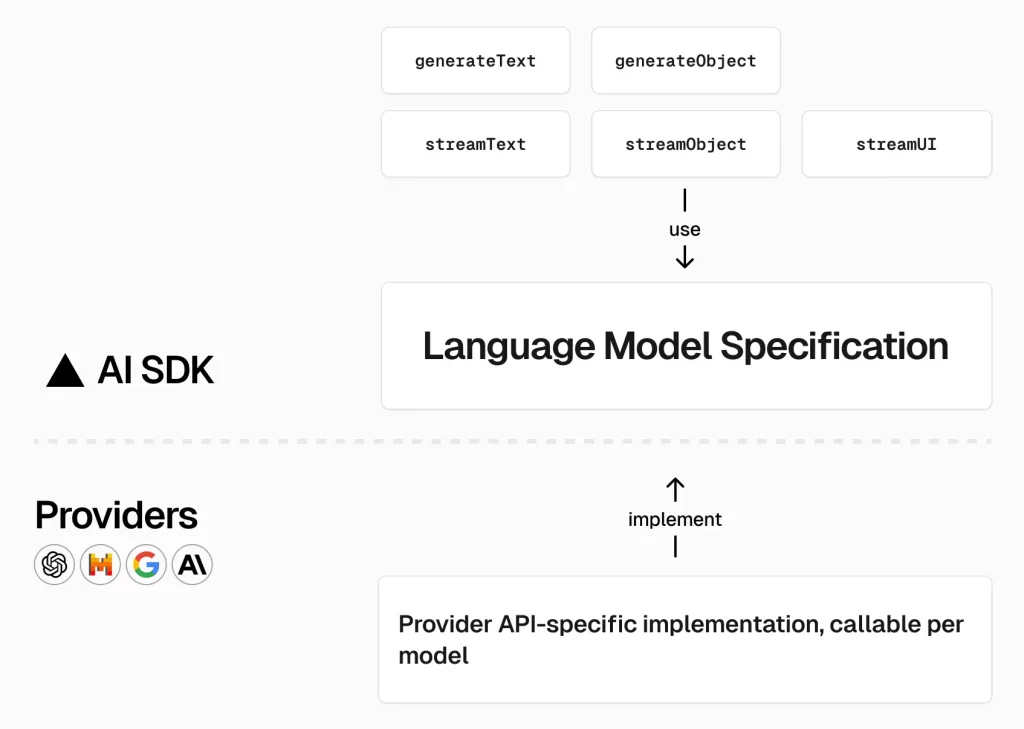
Vercel AI SDK 6.x : エージェント – ループ制御
エージェントループの各ステップで実行フローと設定の両方を制御できます。ループは以下の条件まで継続されます :
- ツール呼び出し以外の終了理由が返される、or
- 呼び出されたツールが実行関数を持たない、or
- ツール呼び出しが承認を必要とする、or
- 停止条件が満たされる
AI SDK は停止条件を定義する stopWen とステップ間の設定 (モデル、ツール、メッセージ等) を変更する prepareStep という 2 つのパラメータを通して組み込みのループを提供しています。
停止条件
stopWhen パラメータは、最後のステップにツールの結果がある場合にいつ実行を停止するか制御します。デフォルトでは、エージェントは stepCountIs(20) を使用して 20 ステップ後に停止します。
stopWhen を提供すると、エージェントはツール呼び出し後も停止条件が満たされるまで実行を継続します。条件が配列の場合、いずれかの条件が満たされると実行は停止します。
組み込み条件の使用
AI SDK はいくつかの組み込みの停止条件を提供しています :
Gateway
import { ToolLoopAgent, stepCountIs } from 'ai';

const agent = new ToolLoopAgent({
  model: "openai/gpt-4o-mini",
  tools: {
    // your tools
  },
  stopWhen: stepCountIs(20), // Default state: stop after 20 steps maximum
});

const result = await agent.generate({
  prompt: 'Analyze this dataset and create a summary report',
});
複数の条件を組み合わせる
複数の停止条件を組み合わせます。ループはいずれかの条件を満たす場合に停止します :
Gateway
import { ToolLoopAgent, stepCountIs, hasToolCall } from 'ai';

const agent = new ToolLoopAgent({
  model: "openai/gpt-4o-mini",
  tools: {
    // your tools
  },
  stopWhen: [
    stepCountIs(20), // Maximum 20 steps
    hasToolCall('someTool'), // Stop after calling 'someTool'
  ],
});

const result = await agent.generate({
  prompt: 'Research and analyze the topic',
});
カスタム条件の作成
特定の要件に合わせてカスタム停止条件を構築します :
Gateway
import { ToolLoopAgent, StopCondition, ToolSet } from 'ai';

const tools = {
  // your tools
} satisfies ToolSet;

const hasAnswer: StopCondition = ({ steps }) => {
  // Stop when the model generates text containing "ANSWER:"
  return steps.some(step => step.text?.includes('ANSWER:')) ?? false;
};

const agent = new ToolLoopAgent({
  model: "openai/gpt-4o-mini",
  tools,
  stopWhen: hasAnswer,
});

const result = await agent.generate({
  prompt: 'Find the answer and respond with "ANSWER: [your answer]"',
});
カスタム条件はすべてのステップにわたりステップ情報を受け取ります :
const budgetExceeded: StopCondition = ({ steps }) => {
  const totalUsage = steps.reduce(
    (acc, step) => ({
      inputTokens: acc.inputTokens + (step.usage?.inputTokens ?? 0),
      outputTokens: acc.outputTokens + (step.usage?.outputTokens ?? 0),
    }),
    { inputTokens: 0, outputTokens: 0 },
  );

  const costEstimate =
    (totalUsage.inputTokens * 0.01 + totalUsage.outputTokens * 0.03) / 1000;
  return costEstimate > 0.5; // Stop if cost exceeds $0.50
};
ステップの準備 (Prepare Step)
prepareStep コールバックはループ内の各ステップの前に実行され、どのような変更も返さない場合には初期設定がデフォルトになります。設定の変更、コンテキストの管理、実行履歴に基づく動的な動作の実装のためにそれを使用します。
動的モデル選択
ステップの要件に基づいてモデルを切り替えます :
Gateway
import { ToolLoopAgent } from 'ai';

const agent = new ToolLoopAgent({
  model: 'openai/gpt-4o-mini', // Default model
  tools: {
    // your tools
  },
  prepareStep: async ({ stepNumber, messages }) => {
    // Use a stronger model for complex reasoning after initial steps
    if (stepNumber > 2 && messages.length > 10) {
      return {
        model: "openai/gpt-4o-mini",
      };
    }
    // Continue with default settings
    return {};
  },
});

const result = await agent.generate({
  prompt: '...',
});
コンテキスト管理
長期実行されるループ内で増大する会話履歴を管理します :
Gateway
import { ToolLoopAgent } from 'ai';

const agent = new ToolLoopAgent({
  model: "openai/gpt-4o-mini",
  tools: {
    // your tools
  },
  prepareStep: async ({ messages }) => {
    // Keep only recent messages to stay within context limits
    if (messages.length > 20) {
      return {
        messages: [
          messages[0], // Keep system instructions
          ...messages.slice(-10), // Keep last 10 messages
        ],
      };
    }
    return {};
  },
});

const result = await agent.generate({
  prompt: '...',
});
ツール選択
各ステップでどのツールが利用可能な制御します :
Gateway
import { ToolLoopAgent } from 'ai';

const agent = new ToolLoopAgent({
  model: "openai/gpt-4o-mini",
  tools: {
    search: searchTool,
    analyze: analyzeTool,
    summarize: summarizeTool,
  },
  prepareStep: async ({ stepNumber, steps }) => {
    // Search phase (steps 0-2)
    if (stepNumber <= 2) {
      return {
        activeTools: ['search'],
        toolChoice: 'required',
      };
    }

    // Analysis phase (steps 3-5)
    if (stepNumber <= 5) {
      return {
        activeTools: ['analyze'],
      };
    }

    // Summary phase (step 6+)
    return {
      activeTools: ['summarize'],
      toolChoice: 'required',
    };
  },
});

const result = await agent.generate({
  prompt: '...',
});
特定のツールが使用されるように強制することもできます :
prepareStep: async ({ stepNumber }) => {
  if (stepNumber === 0) {
    // Force the search tool to be used first
    return {
      toolChoice: { type: 'tool', toolName: 'search' },
    };
  }

  if (stepNumber === 5) {
    // Force the summarize tool after analysis
    return {
      toolChoice: { type: 'tool', toolName: 'summarize' },
    };
  }

  return {};
};
メッセージ変更
メッセージをモデルに送信する前に変換します :
Gateway
import { ToolLoopAgent } from 'ai';

const agent = new ToolLoopAgent({
  model: "openai/gpt-4o-mini",
  tools: {
    // your tools
  },
  prepareStep: async ({ messages, stepNumber }) => {
    // Summarize tool results to reduce token usage
    const processedMessages = messages.map(msg => {
      if (msg.role === 'tool' && msg.content.length > 1000) {
        return {
          ...msg,
          content: summarizeToolResult(msg.content),
        };
      }
      return msg;
    });

    return { messages: processedMessages };
  },
});

const result = await agent.generate({
  prompt: '...',
});
ステップ情報へのアクセス
stopWhen と prepareStep の両方は現在の実行について詳細な情報を受け取ります :
prepareStep: async ({
  model, // Current model configuration
  stepNumber, // Current step number (0-indexed)
  steps, // All previous steps with their results
  messages, // Messages to be sent to the model
}) => {
  // Access previous tool calls and results
  const previousToolCalls = steps.flatMap(step => step.toolCalls);
  const previousResults = steps.flatMap(step => step.toolResults);

  // Make decisions based on execution history
  if (previousToolCalls.some(call => call.toolName === 'dataAnalysis')) {
    return {
      toolChoice: { type: 'tool', toolName: 'reportGenerator' },
    };
  }

  return {};
},
手動のループ制御
エージェントループに対する完全な制御を必要とするシナリオでは、stopWhen と prepareStep を使用する代わりに AI SDK Core 関数 (generateText と streamText) を使用して独自のループ管理を実装できます。このアプローチは複雑なワークフローに対して最大限の柔軟性を提供します。
手動ループの実装
実行の完全な制御を必要とする場合は独自のエージェントループを構築します :
Gateway
import { generateText, ModelMessage } from 'ai';

const messages: ModelMessage[] = [{ role: 'user', content: '...' }];

let step = 0;
const maxSteps = 10;

while (step < maxSteps) {
  const result = await generateText({
    model: "openai/gpt-4o-mini",
    messages,
    tools: {
      // your tools here
    },
  });

  messages.push(...result.response.messages);

  if (result.text) {
    break; // Stop when model generates text
  }

  step++;
}
この手動アプローチは以下に対する完全な制御を与えます :
- メッセージ履歴の管理
- ステップ毎の意思決定
- カスタム停止条件
- 動的なツールとモデルの選択
- エラー処理とリカバリー
Learn more about manual agent loops in the cookbook.
以上