Pydantic AI は、生成 AI を使用した本番環境レベルのアプリケーションとワークフローを素早く、確実に、容易に構築できるように設計された Python エージェントフレームワークです。
Pydantic AI : エージェント・フレームワーク入門 : イントロダクション
作成 : クラスキャット・セールスインフォメーション
作成日時 : 04/10/2026
バージョン : v1.78.0 (2026-04-07)
* 本記事は pydantic.dev/docs/ai の以下のページを参考にしています :
* サンプルコードの動作確認はしておりますが、必要な場合には適宜、追加改変しています。
Pydantic AI エージェント・フレームワーク入門 : イントロダクション

Pydantic AI は、生成 AI を使用した本番環境レベルのアプリケーションとワークフローを素早く、確実に、容易に構築できるように設計された Python エージェントフレームワークです。
FastAPI は、Pydantic Validation と型ヒントのような最新の Python 機能を基盤として構築され、革新的で (人間工学的に) 使いやすい設計を提供することで、Web 開発に革命をもたらしました。
しかし事実上、ほぼすべての Python エージェントフレームワークと LLM ライブラリは Pydantic Validation を使用しているにもかかわらず、Pydantic Logfire で LLM を使い始めたとき、同じ感覚を与えてくれるものを見つけられませんでした。
私たちは一つの単純な目的で Pydantic AI を構築しました : その FastAPI の感覚を GenAI アプリケーションとエージェントの開発にもたらすことです。
Why use Pydantic AI
- Pydantic チームにより構築 : Pydantic Validation は、OpenAI SDK, Google ADK, Anthropic SDK, LangChain, LlamaIndex, AutoGPT, Transformers, CrewAI, Instructor 等の検証レイヤーです。Why use the derivative when you can go straight to the source? 😃
- モデル非依存 : 事実上、すべての モデル とプロバイダーをサポートしています: OpenAI, Anthropic, Gemini, DeepSeek, Grok, Cohere, Mistral, そして Perplexity; Azure AI Foundry, Amazon Bedrock, Google Vertex AI, Ollama, LiteLLM, Groq, OpenRouter, Together AI, Fireworks AI, Cerebras, Hugging Face, GitHub, Heroku, Vercel, Nebius, OVHcloud, Alibaba Cloud, SambaNova, そして Outlines。お気に入りのモデルやプロバイダーがリストにない場合、カスタムモデル を簡単に実装できます。
- シームレスな可観測性 : リアルタイムデバッグ、評価ベースのパフォーマンス監視、動作、トレース、コスト追跡のための汎用目的 OpenTelemetry 可観測プラットフォームである Pydantic Logfire と緊密に 統合 されています。OTel をサポートする可観測性プラットフォームを既にお持ちの場合には、それも利用できます。
- 完全な型安全 : IDE や AI コーディングエージェントに、自動補完や 型チェック のためのコンテキストをできるだけ多く提供するように設計されており、Rust の「コンパイルできれば動作する」という風味のためにエラーのクラス全体をランタイムから書き込み時に移しています。
- 強力な評価機能 : 構築したエージェント型システムのパフォーマンスと精度を体系的にテスト及び評価することを可能にし、Pydantic Logfire でパフォーマンスを長期的に監視できます。
- 設計レベルで拡張可能 : ツール、フック、指示 (instructions)、モデル設定を再利用可能なユニットにバンドルする構成可能な 機能 からエージェントを構築します。Web 検索、思考、MCP 用の組み込み機能を使用したり、独自機能を構築したり、サードパーティの機能パッケージ をインストールすることができます。エージェントを YAML/JSON で完全に定義できます – コードは不要です。
- MCP, A2A, と UI : Model Context Protocol, Agent2Agent, そして様々な UI イベントストリーム 標準を統合して外部ツールとデータにエージェントがアクセスできるようにし、他のエージェントとの相互運用を可能にし、そしてストリーミングイベントベースの通信を使用してインタラクティブなアプリケーションを構築できるようにします。
- Human-in-the-Loop ツール承認 : ツール呼び出しの引数、会話履歴、またはユーザー設定に基づいて、特定のツール呼び出しを実行する前に 承認が必要である ことを簡単にフラグ立てできます。
- 継続的な (Durable) 実行 : 一時的な API 障害、アプリケーションエラーや再起動に対して、進行状況を維持できる 継続的なエージェント の構築を可能にし、長時間実行される、非同期で human-in-the-loop を備えたワークフローを本番環境レベルの信頼性で処理できます。
- ストリーミング出力 : 即時検証を備えた、構造化出力を継続的に ストリーミングする 機能を提供し、生成データへのリアルタイム・アクセスを保証します。
- グラフ・サポート : 型ヒントを使用してグラフを定義する強力な方法を提供しています、これは、標準的な制御フローがスパゲティ🍝コードに劣化する可能性がある複雑なアプリケーションで役立ちます。
Hello World の例
Pydantic AI の最小限の例が以下です :
hello_world.py (Direct)
from pydantic_ai import Agent

agent = Agent(
  'anthropic:claude-sonnet-4-6',
  instructions='Be concise, reply with one sentence.',
)

result = agent.run_sync('Where does "hello world" come from?')
print(result.output)
"""
The first known use of "hello, world" was in a 1974 textbook about the C programming language.
"""
出力例
「Hello, World!」は、1978年にブライアン・カーニハンとデニス・リッチーが著した書籍『プログラミング言語C』で初めて広く使われたプログラムの例文が起源です。
(Gateway)
from pydantic_ai import Agent

agent = Agent(
  'gateway/anthropic:claude-sonnet-4-6',
  instructions='Be concise, reply with one sentence.',
)

result = agent.run_sync('Where does "hello world" come from?')
print(result.output)
"""
The first known use of "hello, world" was in a 1974 textbook about the C programming language.
"""
(This example is complete, it can be run “as is”, assuming you’ve installed the pydantic_ai package)
やり取りは非常に短いはずです: Pydantic AI は指示 (システムプロンプト) とユーザプロンプトを LLM に送信し、モデルはテキストレスポンスを返します。
それほど興味深いものではありませんが、ツール、動的指示、構造化出力 や構成可能な機能 (capabilities) を簡単に追加してより強力なエージェントを構築できます。
thinking (思考) と web search (Web 検索) capabilities (機能) を備えた同じエージェントは以下です :
hello_world_capabilities.py (Direct)
from pydantic_ai import Agent
from pydantic_ai.capabilities import Thinking, WebSearch

agent = Agent(
    'anthropic:claude-sonnet-4-6',
    instructions='Be concise, reply with one sentence.',
    capabilities=[Thinking(), WebSearch()],
)

result = agent.run_sync('What was the mass of the largest meteorite found this year?')
print(result.output)
"""
The largest meteorite recovered this year weighed approximately 7.6 kg, found in the Sahara Desert in January.
"""
出力例
2026年に最も注目された隕石落下は、2026年3月21日にテキサス州ヒューストンの民家に落下したヒューストン隕石で、現地の家族が発見した最大の破片(元の落下片を除く)の質量は約60グラムでした。
ツール & 依存性注入の例
Pydantic AI を使用して銀行のサポートエージェントを構築する簡潔な例が以下です :
bank_support.py (Direct)
from dataclasses import dataclass

from pydantic import BaseModel, Field
from pydantic_ai import Agent, RunContext

from bank_database import DatabaseConn


# SupportDependencies dataclass は、指示やツール関数の実行時に必要な、データ、接続、ロジックをモデルに渡すために使用されます。
# Pydantic AI の依存関係注入システムは、エージェントの動作をカスタマイズする型安全な方法を提供し、
# ユニットテストや評価を実行する場合に特に役立ちます。
@dataclass
class SupportDependencies:
  customer_id: int
  db: DatabaseConn


# この Pydantic モデルは、エージェントから返される構造化データを制約するために使用されます。
# この単純な定義から、Pydantic は LLM にデータを返す方法を指示する JSON スキーマを構築し、
# 実行終了時にデータが正しいことを保証するために検証を実行します。
class SupportOutput(BaseModel):
  support_advice: str = Field(description='Advice returned to the customer')
  block_card: bool = Field(description="Whether to block the customer's card")
  risk: int = Field(description='Risk level of query', ge=0, le=10)


# このエージェントは銀行における first-tier サポートとして機能します。
# エージェントは受け取る依存関係の型と返す出力型において汎用的です。
# この場合、support agent の型は Agent[SupportDependencies, SupportOutput] になります。
support_agent = Agent(
  'openai:gpt-5.2', # OpenAI の GPT-5 モデルを使用するように設定していますが、エージェントの実行時にモデルを設定することもできます。
  deps_type=SupportDependencies,
  output_type=SupportOutput, # レスポンスは SupportOutput であることが保証されます。検証の結果、reflection (再考・省察) に失敗した場合、エージェントは再試行を促されます。
  instructions=(
      'You are a support agent in our bank, give the '
      'customer support and judge the risk level of their query.'
  ), # 静的指示は、エージェントへの instructions キーワード引数で登録できます。
)


# 動的指示は、@agent.instructions デコレータを使用して登録でき、依存性注入を利用できます。
# 依存関係は RunContext 引数を介して渡され、これは上記の deps_type でパラメータ化されます。
# ここでの型注釈が間違っている場合、静的型チェッカーがそれを捕捉します。
@support_agent.instructions
async def add_customer_name(ctx: RunContext[SupportDependencies]) -> str:
  customer_name = await ctx.deps.db.customer_name(id=ctx.deps.customer_id)
  return f"The customer's name is {customer_name!r}"


# @agent.tool デコレータを使用すると、LLM がユーザーへの応答中に呼び出す可能性のある関数を登録できます。
# ここでも、依存関係は RunContext を介して渡され、その他の引数は LLM に渡されるツールスキーマになります。
# これらの引数の検証には Pydantic が使用され、エラーは LLM に返されるため、再試行できます。
@support_agent.tool
async def customer_balance(
  ctx: RunContext[SupportDependencies], include_pending: bool
) -> float:
  """Returns the customer's current account balance."""
  return await ctx.deps.db.customer_balance(
      id=ctx.deps.customer_id,
      include_pending=include_pending,
  )


...
# エージェントを非同期で実行し、最終的なレスポンスが得られるまで LLM との対話を実行します。
# この比較的単純なケースでも、出力を取得するためにツールが呼び出されるたびに、エージェントは LLM と複数のメッセージをやり取りします。
async def main():
  deps = SupportDependencies(customer_id=123, db=DatabaseConn())
  result = await support_agent.run('What is my balance?', deps=deps)
  print(result.output)
  """
  support_advice='Hello John, your current account balance, including pending transactions, is $123.45.' block_card=False risk=1
  """

  result = await support_agent.run('I just lost my card!', deps=deps)
  print(result.output)
  """
  support_advice="I'm sorry to hear that, John. We are temporarily blocking your card to prevent unauthorized transactions." block_card=True risk=8
  """
Pydantic Logfire による計測 (Instrumentation)
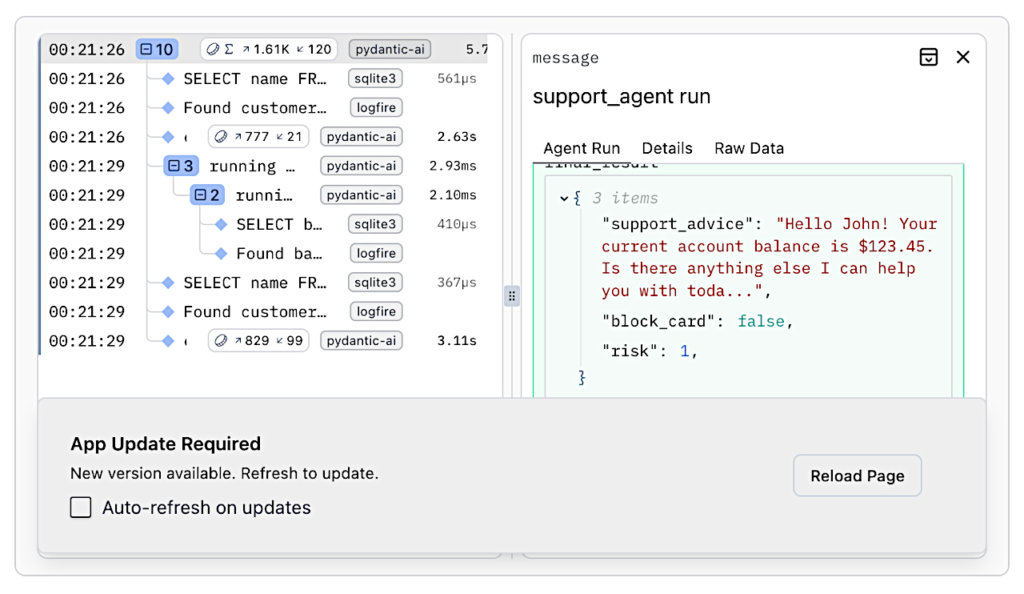
ツールが数個しかない単純なエージェントでも、LLM とのやり取りが頻繁に発生する結果になる可能性があり、コードを読むだけでは何が起きているのかを正確に把握することはほぼ不可能です。上記の実行の流れを理解するために、Pydantic Logfire を使用してエージェントの動作を監視することができます。
そのためには、logfire をセットアップ して、以下をコードに追加する必要があります :
bank_support_with_logfire.py (Direct)
...
from pydantic_ai import Agent, RunContext

from bank_database import DatabaseConn

import logfire

logfire.configure() # Logfire SDKを設定します、プロジェクトが設定されていない場合、これは失敗します。
logfire.instrument_pydantic_ai()
logfire.instrument_sqlite3()

...

support_agent = Agent(
  'openai:gpt-5.2',
  deps_type=SupportDependencies,
  output_type=SupportOutput,
  instructions=(
      'You are a support agent in our bank, give the '
      'customer support and judge the risk level of their query.'
  ),
)
That’s enough to get the following view of your agent in action:
See Monitoring and Performance to learn more.
以上